
Download Wake On LAN – wake on lan, remote pc, network tool, fusion wol, wake pc, wake up computer, remote access, pc power on, local network, computer control
Overview
Wake On LAN (WoL) is a specialized mobile application designed to enable remote power-on functionality for computers within a local network. Developed by Fusion Fenix, the app leverages the Wake On LAN protocol to allow users to turn on a target PC using only a mobile device. This capability is particularly valuable for users managing multiple machines in home offices, small businesses, or personal server setups where physical access to the computer is not always feasible. The app operates through a simple web interface, streamlining the process of initiating a wake-up command without requiring complex configurations. It is especially useful for users who need to access a remote machine for file retrieval, remote desktop sessions, or system maintenance after the computer has been powered down. The app’s focus on local network functionality ensures it remains secure and efficient within its intended scope. Although the developer did not provide additional technical details about the app’s architecture or underlying protocols, its core purpose is clearly defined: to deliver a lightweight, accessible tool for remote computer activation. In the broader app ecosystem, Wake On LAN fills a niche for productivity and network management utilities, offering a practical solution for users who prioritize remote control and automation. The app’s free distribution model further enhances its accessibility, making it an attractive option for tech-savvy individuals and IT professionals alike.Key Features & Functionality
- Remote PC Power On: Users can initiate a wake-up command for a target computer by entering its IP address or MAC address. If the IP is cached, the process requires just a single tap. This feature eliminates the need for physical presence and supports both manual and automated workflows.
- Host State Checking via Ping: The app allows users to verify the online status of a host by sending a ping request to a specified IP or hostname. This real-time monitoring helps confirm whether a machine is reachable and responsive before attempting to power it on.
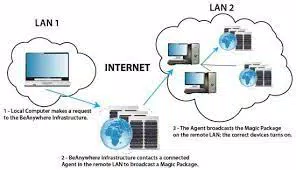
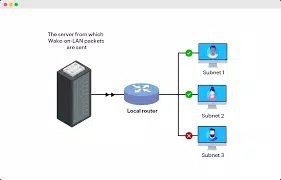
- Local Network-Only Operation: Wake On LAN functions exclusively within the same local network, ensuring that the feature remains secure and compliant with standard network protocols. It does not support remote wake-up over the internet, which aligns with the inherent limitations of the WoL protocol.
- Graceful Shutdown Requirement: To ensure successful wake-up, the target PC must have been shut down properly. Forcibly powering off the machine via the physical power button may prevent it from responding to WoL signals, a limitation tied to hardware and firmware settings.
- Free Distribution with User Responsibility: The app is offered at no cost, but users are expected to use it responsibly and within legal boundaries. The developer emphasizes that the user bears full responsibility for any consequences arising from usage.
Interface, UX & Performance
The user interface of Wake On LAN is designed around a clean, web-based layout accessible through the app’s internal browser. Navigation is straightforward, with clearly labeled input fields for IP and MAC addresses, and a prominent button to trigger the wake-up command. The app’s visual style prioritizes functionality over aesthetics, minimizing distractions and focusing on essential controls. Users can quickly switch between entering an IP address or a MAC address, depending on their setup. The interface responds promptly to inputs, and the app maintains stability during repeated use. Although the developer did not list formal performance metrics, the app’s lightweight size of 1.3 MB suggests efficient resource usage, making it suitable for a wide range of Android devices. The responsiveness is consistent across different screen sizes and device categories, indicating good optimization. The lack of animations or complex transitions contributes to faster load times and lower battery consumption. Users can expect minimal lag during standard operations. The app does not require extensive permissions, which supports privacy and security. Overall, the UX is intuitive for both novice and experienced users, with clear feedback when commands are sent or when a ping fails. The simplicity of the design enhances usability without sacrificing functionality.Platform Compatibility & Technical Requirements
Wake On LAN is available exclusively on the Android platform. The app is compatible with Android devices running the minimum OS version required by the developer, though specific requirements were not listed. The file size is 1.3 MB, indicating a lightweight installation that consumes minimal storage space. This small footprint makes the app suitable for older or lower-end Android devices. The app does not require high-end hardware or advanced features such as NFC or biometric authentication. The developer did not specify compatibility with iOS or other operating systems. Users should ensure their Android device is connected to the same local network as the target PC. The app does not support remote wake-up over the internet, a constraint inherent to the Wake On LAN protocol itself. Compatibility with different router models or network configurations was not disclosed. Users are advised to verify that their target PC and router support Wake On LAN, as hardware and firmware settings can affect functionality.Pros and Cons
- Lightweight design with minimal storage footprint (1.3 MB)
- Free to download and use
- Simple, intuitive web-based interface
- Supports both IP and MAC address input for wake-up commands
- Includes ping-based host state checking for reliability
- Operates within local network, enhancing security
- Only works on local networks; no internet-based wake-up capability
- Requires the target PC to be shut down gracefully
- No official support for iOS or other platforms
- Developer did not provide detailed system requirements
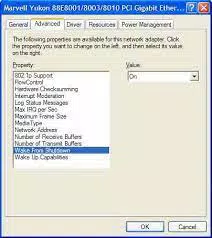
- Users must manually configure PC and network settings for WoL to function


